
Le Pass
New Orleans Regional Transit AuthorityMaps & Navigation
4.31.16K Reviews
- Version
- 5.197.0.1799
- Installs
- 100.00K
- Age Rating
- Everyone
Screenshots
Our Review of Le Pass
 Analysis by Appyee
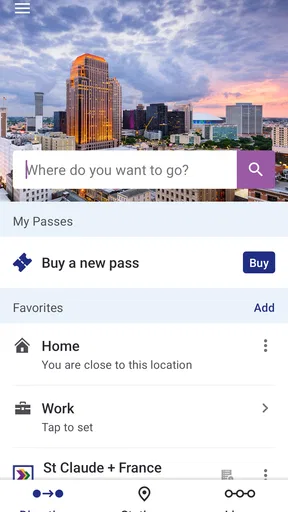
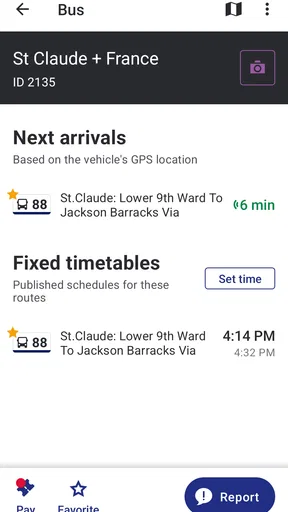
Getting around New Orleans by bus, streetcar, or ferry can be simple once the trip is planned, but the difficult part is often knowing where to begin. Le Pass is the official transit app from the New Orleans Regional Transit Authority, built for planning journeys and purchasing passes in one place. I found its purpose refreshingly focused: it is not trying to replace every map app on your phone, but to give RTA riders a more direct way to organize public transport.
That focus makes it useful for visitors who do not know the network well and for local riders who want a digital pass instead of handling a paper option. It is free, available to everyone, and sits in the Maps & Navigation category. The app has an average rating of 4.3 from around 2,400 ratings, with more than 100,000 installs, so it has a meaningful user base without being one of those enormous all-purpose navigation platforms.
Where the first trip can become confusing
The biggest challenge is not necessarily using the app itself; it is translating a real New Orleans journey into the information the app needs. A visitor may think in terms of a landmark, hotel, neighborhood, or event, while transit planning works better when the starting point and destination are entered clearly. If you are standing on a busy street and type a vague place name, you may spend more time correcting the trip than checking the route.
I recommend beginning with the exact place where you expect to board rather than simply entering the name of a neighborhood. This is particularly important when a journey could involve a streetcar stop, a bus stop, or a ferry landing. Two locations that look close on a general map can involve very different walking approaches, and the most convenient option may depend on which side of the street or river you are actually using.
Another common point of friction is assuming that buying a pass and planning a journey are the same task. They are related, but they solve different problems. A route plan helps you decide how to travel; a pass handles payment for the RTA service. I would plan the journey first, then choose the pass option that fits the day, rather than purchasing something immediately and only afterward discovering that your itinerary is more complicated than expected.
This order is especially helpful for occasional riders. If you are visiting New Orleans for one outing, you may not yet know whether your day will involve a single ride, several transfers, or a mixture of bus, streetcar, and ferry travel. Thinking through the itinerary before committing to a pass reduces the chance of making a rushed choice while standing at a stop.
What to check before relying on the screen
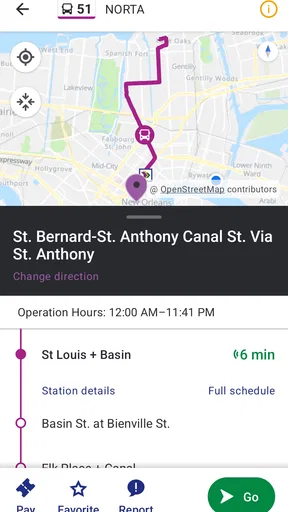
Before leaving, I would confirm the starting location, the destination, and the type of transit shown in the result. A route involving a streetcar may feel very different from one involving a bus, even if both appear as reasonable choices. A ferry segment also changes the rhythm of the trip because the water crossing is not interchangeable with ordinary road travel.
Pay attention to the walking portion at both ends. A route can be technically correct while still being awkward if you are carrying luggage, traveling with children, or arriving after dark. The app can help organize the transit leg, but you still need to use ordinary judgment about sidewalks, crossings, weather, and the amount of time you have available.
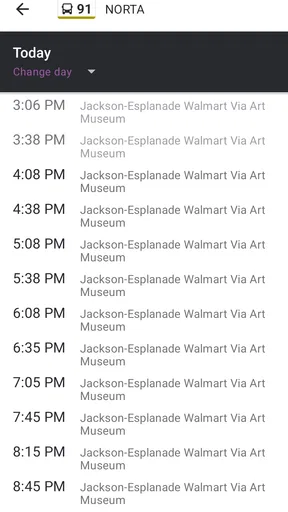
It is also worth checking the app before you are already late. Transit tools are most useful when you have a small planning buffer. If you open the app only after a vehicle has left, the next available option may force you into a different combination of services. I prefer to prepare the route while connected and then keep the relevant details visible when I am heading to the stop.
Setup checks that prevent avoidable problems
Le Pass supports devices running Android 7.0 or later, and the current version is 5.197.0.1799. That makes the basic compatibility question straightforward for most Android users, but an older phone can still create a poor experience if the operating system is outdated, storage is nearly full, or the app has not been updated properly.
My first setup check would be simple: install the app while you have a reliable connection, open it before the trip, and make sure the main planning and pass-purchase screens load normally. Doing this at home or in a hotel is much less stressful than discovering an installation or sign-in issue beside a stop.
If the app behaves strangely during setup, I would avoid immediately repeating a payment attempt. First close and reopen it, check the connection, and confirm that the device has enough free space for normal operation. If an update is available, installing it before traveling is sensible. These are ordinary checks, but they matter more when the phone is being used as both a route guide and a proof of transit payment.
Another practical habit is to keep the phone charged. Le Pass is not a replacement for a physical backup plan when your battery is nearly empty. A digital pass is only useful if you can access the device at the moment you need it, so a portable charger is more valuable than it may seem for a full day of sightseeing.
I would also avoid setting up an important trip while switching repeatedly between weak public networks. A stable connection makes it easier to distinguish an actual app problem from a temporary network delay. If the screen appears to pause, give it a moment before tapping the same button several times. Repeated taps can make it harder to tell whether a request is still processing.
Buying a pass with fewer surprises
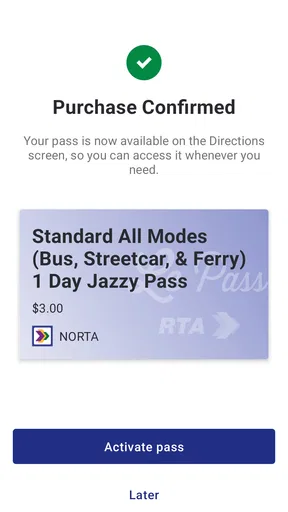
The pass-purchase function is one of the clearest reasons to use this app instead of treating it as just another route planner. I like the convenience of keeping the transportation decision and payment step together, but I would still read each screen carefully before confirming. Make sure the selected product matches the way you expect to travel and that you understand which part of the journey it is intended to cover.
This is where the app is more useful than a generic map application. A general map may show that a bus or streetcar can take you somewhere, but it usually does not provide the same direct connection to the RTA pass process. Le Pass is therefore the better tool when the question is not only “How do I get there?” but also “How do I prepare to ride the RTA service?”
For a group, I would plan the purchase before everyone separates. One person may be holding the phone, while another is checking the route or watching luggage. Keeping the process deliberate helps avoid confusion at boarding time. I would also make sure each traveler understands whether the phone is being used for one person’s pass or for a wider group arrangement, rather than assuming that a single purchase automatically solves every rider’s needs.
If you are unsure which pass fits your plans, use the route information and your expected number of rides as the starting point. Do not choose solely because an option appears first. A short outing and a day that crosses multiple parts of the city may justify different decisions, and the best value depends on how you actually intend to use the network.
Recovering when the workflow breaks
When something goes wrong, the most useful approach is to identify the exact stage that failed. Did the route fail to appear, did the pass screen fail to load, or did the purchase process stop after information was entered? Treating all three situations as one generic “the app is broken” problem usually leads to unnecessary repetition.
For a route-planning issue, I would recheck the locations first. Try a more precise starting point, remove unnecessary wording, and make sure the destination is the intended entrance or stop rather than a broad attraction name. If the result still looks implausible, compare the displayed route with the physical street signs and stop information around you before walking in the wrong direction.
For a loading issue, I would switch between a dependable mobile connection and Wi-Fi if both are available, then reopen the app. If the problem disappears after that, the original difficulty may have been the network rather than the transit information. This distinction matters because reinstalling an app will not repair a weak connection, and it can create additional setup work.
For a purchase concern, pause before trying again. Check whether the app shows that the transaction or pass step completed, and avoid creating duplicate attempts simply because the screen took longer than expected. Keep any confirmation that appears on the device, and if the result remains unclear, use the app’s available support route or the RTA’s official customer-service channels rather than guessing.
A useful recovery habit is to keep a small amount of trip information outside the app. I do not mean copying every detail, but noting the destination, the intended service, and the general direction can prevent a dead battery or temporary connection problem from turning into a complete loss of orientation. Le Pass is convenient, yet sensible travelers should not make one phone screen their only source of information.
When the app is not the cause
Transit journeys involve more than software. A delayed vehicle, a crowded stop, road work, weather, a missed connection, or a change in boarding conditions can make an accurate plan feel wrong. It is important not to blame the app automatically when the real issue is happening on the street.
If the route looks reasonable but the vehicle does not arrive as expected, compare the app’s information with the stop signage and what other passengers are doing. A map application can show a useful walking path, but it may not explain every practical detail of standing at a particular stop. Local conditions still deserve attention.
The same applies to ferry travel. A route that includes a water crossing should be treated as a distinct part of the day, not merely another line on a map. Give yourself more flexibility around that segment and avoid planning an important appointment with no margin. The app can help you include the ferry in the journey, but it cannot remove the uncertainty created by weather or changing conditions.
Streetcars and buses also create different expectations. A visitor accustomed to a tightly timed subway may find surface transit less predictable because it shares space with traffic and requires more awareness of stops. If you need the fastest possible door-to-door journey, a rideshare or taxi may be preferable for that particular trip. Le Pass is strongest when you want to use the RTA network, not when public transit itself is the wrong fit.
Who will get the most from Le Pass?
I think this app is especially well suited to visitors who want to use New Orleans public transportation without juggling a separate route planner and payment process. It is also a practical choice for residents who regularly move between bus, streetcar, and ferry services and would rather organize those journeys from one RTA-focused app.
It is less compelling for someone who rarely uses public transit and only needs a broad map of walking directions. A general navigation app may be faster for a simple walk, a driving trip, or a journey that does not involve RTA services. Likewise, people who strongly prefer paper tickets or do not want to manage transportation from a phone may find the digital workflow unnecessary.
For a realistic day out, imagine starting near a hotel, taking a streetcar toward a downtown destination, then using a bus for a second stop before returning by another service. I would use Le Pass first to shape the sequence, then purchase the appropriate pass once I understood how many RTA legs the day involved. Before leaving, I would check the walking approaches, charge the phone, and allow extra time for the transfer. That workflow uses the app as a planning aid rather than treating it as an automatic guarantee that every connection will be effortless.
One less obvious benefit is that the app encourages you to think about the whole transit chain. Instead of choosing a vehicle based only on the first leg, you can consider how a bus, streetcar, or ferry fits into the complete outing. That is valuable in a city where the most recognizable service is not always the most convenient one for the final destination.
My practical verdict
After using it as an RTA-focused travel companion, I see Le Pass as a useful specialist app rather than a universal navigation replacement. Its strongest advantage is the combination of trip planning and pass purchasing for New Orleans RTA Bus, Streetcar, and Ferry services. The free price and Everyone content rating also make it easy to recommend for a broad range of riders.
The main limitation is that the app cannot solve every part of a transit day. You still need to enter locations carefully, understand the difference between services, allow room for real-world delays, and keep a backup plan for connectivity or battery trouble. Someone expecting the polished flexibility of a large global map platform may find the narrower focus limiting, while that same focus will appeal to anyone who wants RTA-specific preparation.
The New Orleans Regional Transit Authority has made a tool that is most valuable when used before the rush: plan the route, inspect the walking portions, choose the pass deliberately, and then verify what is happening around you. I would recommend downloading it before a New Orleans transit day, especially if you expect to combine services. My advice is to treat Le Pass as your organized starting point, not your only travel plan.
With that mindset, the app earns its place on my phone. It reduces the awkward gap between finding a route and being ready to ride, while still leaving room for the judgment that public transportation always requires. For RTA passengers, that is a practical improvement; for people traveling entirely by car, walking, or another provider, a different navigation option will probably serve them better.
Verdict
Strengths of Le Pass
- Quickly access your digital travel pass from your phone.
- Useful for checking eligible routes and transport services.
- Reduces the need to carry a physical pass or paper ticket.
- Clear account details help verify pass validity and remaining time.
- Convenient for regular commuters using supported public transport.
Limitations of Le Pass
- Availability depends on the transport network and region supported.
- A dead phone battery can prevent access to your digital pass.
- Some features may require a stable internet connection.
- Account or payment setup may take time before the pass is usable.
- Not all transport operators may accept every pass type in the app.
Similar Picks in This Category
View All
Uber - Request a ride
Uber Technologies, Inc.4.7


inDrive. Rides with fair fares
® SUOL INNOVATIONS LTD4.8

Yandex Go: Taxi Food Delivery
Mikromobilnost LLC Belgrade4.8

Bolt: Request a Ride
Bolt Technology4.8

Rapido: Bike-Taxi, Auto & Cabs
Rapido Bike Taxi4.8
Frequently Asked Questions
What is Le Pass and what can I use it for?
Le Pass is a mobile application designed to give users convenient access to digital pass-related services, information, and account features from their smartphone. Depending on the region and the organization offering it, the app may allow you to view or manage passes, check validity, access benefits, receive updates, and present digital credentials. Available functions can vary by location and account type.
Is Le Pass free to download and use?
Le Pass is generally available to download at no cost from the official app store, although some passes, subscriptions, memberships, events, or services accessed through the application may require payment. Before completing a purchase, carefully review the displayed price, renewal terms, and any applicable taxes. The exact costs depend on the service provider and the pass selected.
Do I need to create an account to use Le Pass?
An account may be required for features such as purchasing a pass, restoring access, synchronizing information between devices, or managing personal details. Some basic information may be visible without signing in, but full functionality usually depends on registration. Use an email address or login method you can access consistently, especially if the app stores an active pass digitally.
Can I use Le Pass without an internet connection?
Some parts of Le Pass may continue working offline after the relevant pass or credential has been downloaded and activated, which can be useful when traveling or when mobile coverage is unavailable. However, initial sign-in, purchases, updates, validation checks, and certain online services may require an internet connection. It is best to open the app and refresh your pass before going offline.
Is Le Pass safe, and what permissions does it request?
Le Pass may request permissions needed to provide its services, such as internet access, notifications, camera access for scanning codes, or location access where location-based features are supported. Review these requests before granting them and check the app’s privacy policy to understand how information is handled. Downloading from the official Google Play Store or Apple App Store is the safest option.
